by Tom Chandler | Feb 28, 2022 | Spreadsheets
Ever wonder “How do I create a simple and easy to use PivotTable?” PivotTables are tools you can use in a spreadsheet to quickly create interactive summary reports (tables) from raw data. Because they are interactive, PivotTables allow you to easily do...

by Tom Chandler | Feb 2, 2021 | Spreadsheets
If you sort a list of month names in Excel, will January or April be first? No fooling, April is the first month, alphabetically. So, if you are not careful, sorting a list of month names may not get you what you wanted. You can however follow these steps to ensure...

by Tom Chandler | Jun 26, 2020 | Databases, Macros, Spreadsheets, Word Processing
Logging Events How do you keep track of the things you are supposed to do? Do you find that sometimes you do the same important things multiple times because you forgot that you had already done it? Worse, what happens when the auditors, boss, consultant, or mother...

by Tom Chandler | May 30, 2020 | Keyboard shortcuts, Spreadsheets
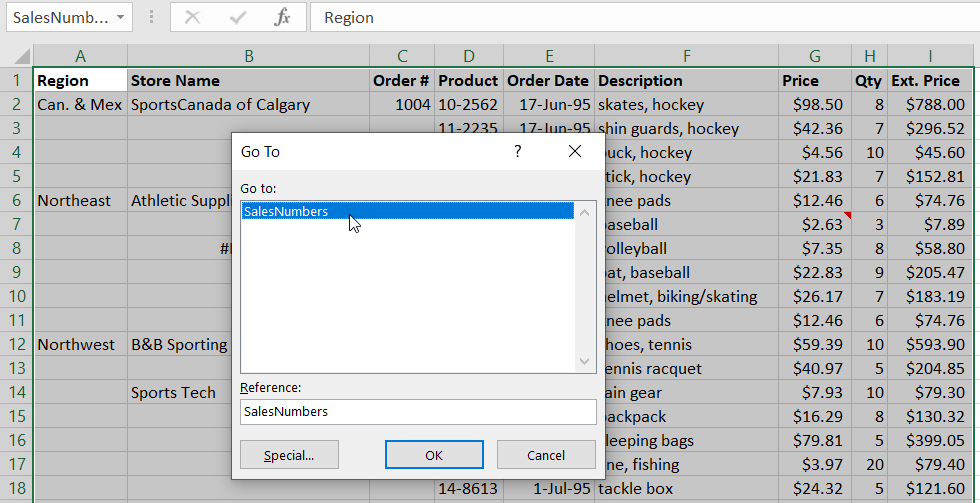
Have you ever had a need to quickly fill in the blanks of a spreadsheet? For example, suppose you need to fill in all the blank regions, store names, and order numbers with the value from the previous cell as shown in the image above. It is true you can “easily” fill...
by Tom Chandler | May 25, 2020 | Keyboard shortcuts, Spreadsheets
When I teach an Introduction to Excel course, I challenge my students to a race, and then I cheat. I first teach them about the arrow keys: the down arrow moves the cursor down one cell, and the up arrow goes up, and the left and right arrows go left and right. We...

by Tom Chandler | May 21, 2020 | Keyboard shortcuts, Spreadsheets
There is a debate about whether Mickey (the mouse) is quicker than the Qwerty (the keyboard). Of course, the answer depends – which one you are more familiar with? If you know, for example, that Ctrl Home will take you to the top of the document, then it will probably...

