
by Tom Chandler | Nov 4, 2026 | Presentations
The Slide Master: Change Once, Update Every SlideOne change at the source flows out to the whole deck.Imagine setting the table for Thanksgiving and deciding, halfway through, that the napkins should be green instead of white. Now imagine there are 60 place settings....

by Tom Chandler | Nov 4, 2026 | Presentations
Music That Carries Across Your PowerPoint SlidesPlay music across slides, from the first photo to the last.Thanksgiving is a perfect time for a family photo slideshow: the year's birthdays, a new grandbaby, the summer camping trip, and that fish Uncle George swears...

by Tom Chandler | Jul 30, 2026 | Spreadsheets, Keyboard shortcuts, Presentations, Tips, Word Processing
The pioneers who crossed the plains toward Utah, Oregon, or California didn't have the luxury of a shortcut. Every mile was earned — on foot, over months, often without knowing exactly how much further the trail would go. You, on the other hand, have a computer. And...

by Tom Chandler | Feb 18, 2025 | Presentations, Spreadsheets, Tips, Word Processing
When it comes to saving files in Microsoft Word, Excel, and/or PowerPoint, I have some bad news and some good news. The bad news I have been frustrated. I hate the Save this File dialog box that comes up when I click the Save icon, or press Ctrl S, or choose File,...
by Tom Chandler | Feb 16, 2021 | Keyboard shortcuts, Presentations, Word Processing
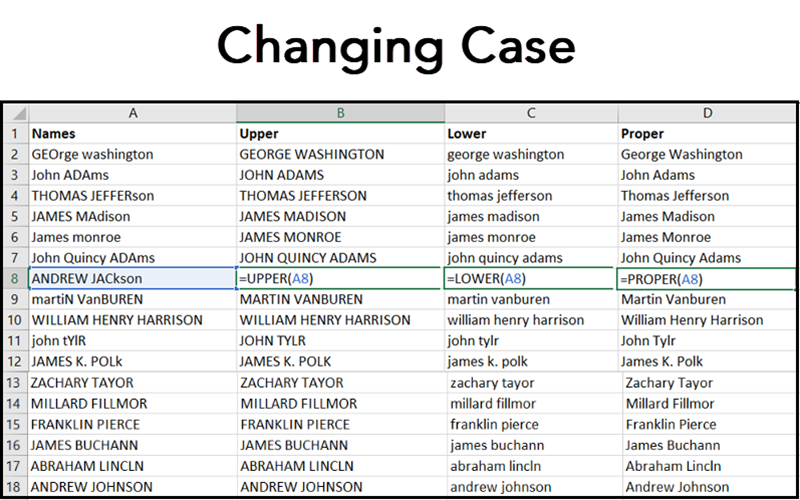
Have you ever had a list where EVERYTHING WAS ACCIDENTALLY ENTERED IN UPPER CASE? oR wORsE It WaS All miXed uP. Of course, you want to fix it, but what is the fastest way to do it? In this blog post we will show you how to do it quickly in Microsoft Word, PowerPoint...

