
Open an unfamiliar database and you can usually tell within thirty seconds whether the person who built it thought about naming. Tables called “Table1,” queries called “Query3,” and a report saved as “Copy of Copy of Report” are a clear sign that whoever built it knew exactly what everything meant — at the time. Six months later, even they don’t remember.
That gap between “makes sense today” and “makes sense to anyone, later” is exactly what a naming convention closes. It doesn’t need to be complicated, and you don’t need to rename everything you’ve already built to start benefiting. You just need a consistent pattern going forward.
Why This Matters More Than It Seems
A database isn’t just a place to store data — it’s something you, your team, and eventually a future employee or consultant will need to navigate quickly. Every minute spent figuring out whether “qryCust2” is the active customer list or an abandoned test query is a minute not spent on the work that actually matters. Multiply that across a database with fifty or a hundred objects, and the cost adds up fast.
Good naming isn’t about being fussy. It’s about making your database self-documenting, so the structure explains itself without a tour guide.
In Microsoft Access: Prefix-Based Naming
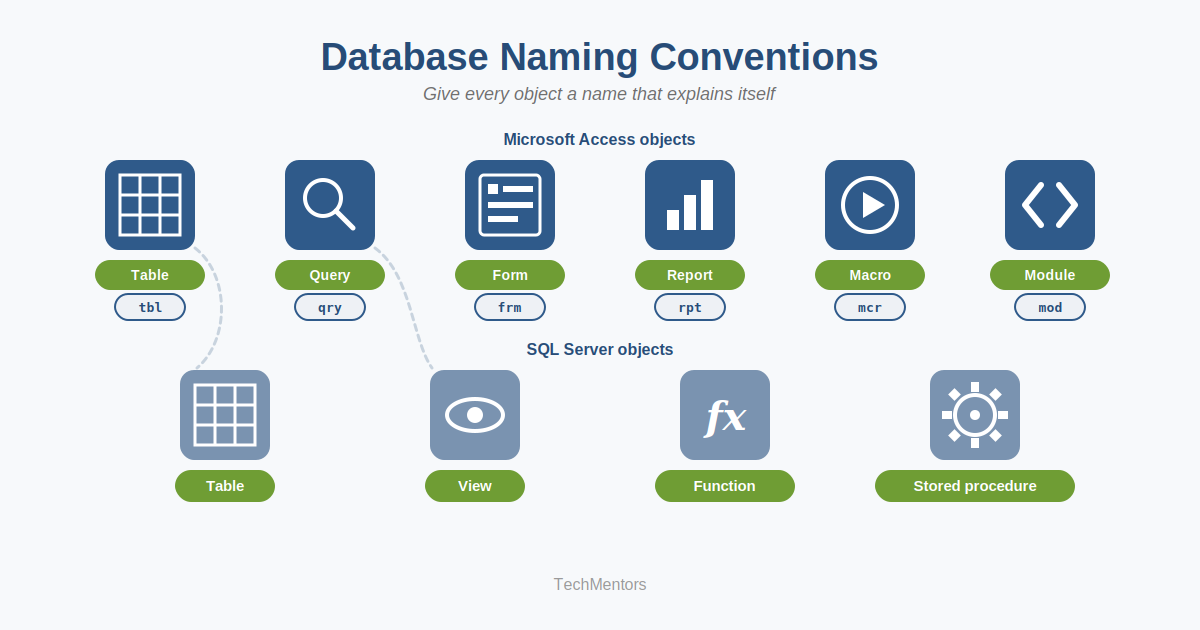
Access has a long tradition of prefix-based naming, and it still works well for the object-heavy way Access databases are typically built. The idea is simple: every object type gets a short, consistent prefix, so the object’s purpose is visible before you even open it.
A commonly used starting set:
- tbl for tables — e.g., tblCustomer, tblOrder
- qry for queries — e.g., qryActiveCustomer, qryMonthlyRevenue
- frm for forms — e.g., frmCustomerEntry, frmOrderLookup
- rpt for reports — e.g., rptMonthlySales, rptOverdueInvoice
- mcr for macros — e.g., mcrMonthlySalesToExcel, mcrImportExpenses
- mod for standalone VBA modules — e.g., modUtilities
The exact prefixes matter less than picking a set and sticking to it. Once your object list is sorted alphabetically in the Navigation Pane, all your tables group together, all your queries group together, and so on — which turns a long, mixed list into something genuinely browsable.
In SQL Server: Schema-Based Naming
Prefix-based naming has fallen out of favor in the SQL Server world, and for good reason — SQL Server gives you a cleaner tool for the same job: schemas. Rather than baking the object type into the name itself, you group related objects into named schemas that describe their purpose or domain.
A simple, effective starting structure:
- core — your primary business tables, such as core.Customer or core.Order
- ref — reference or lookup tables, such as ref.State or ref.OrderStatus
- stg — landing tables used during data imports, such as stg.CustomerImport
- rpt — views and objects built specifically for reports or dashboards
This approach gives you the same “everything related sits together” benefit as Access prefixes, but it also unlocks schema-level security — you can grant a reporting team read access to the rpt schema alone, without touching your core tables at all.
A Few Rules That Apply to Any System
Whether you’re naming Access objects, SQL Server schemas, Excel ranges, or anything else, a handful of habits go a long way:
- Be descriptive, but stay short. tblActiveCustomers2024RevisedFinal defeats the purpose. Aim for a name you could say out loud without losing your place.
- Avoid ALL CAPS. It’s harder to read at a glance and tends to get overused once it starts.
- Keep names unique within their context, so nothing gets confused with something else nearby.
- Apply the convention going forward, not retroactively. Renaming everything at once is rarely worth the risk of broken references. New objects following the standard will gradually outnumber the old ones.
The Payoff
None of this is about perfectionism — it’s about time. A well-named database is faster to work in, easier to hand off, and much less intimidating to a new team member or consultant seeing it for the first time. That’s a meaningful return for a habit that costs nothing but a few extra seconds per object.
Want a more complete framework, including a full prefix and schema reference table you can adapt for your own organization? Our detailed naming convention white paper is available on our Free Stuff page — check it out, and let us know if you’d like help applying it to your own database.
